
The top question I get emailed or asked in my Teachers Pay Teachers store: Can you help me? When I open your file, it shows these black bars. What do I do?
The number two question/statement: My computer won’t open your product because it says it is corrupted. What do I do?
Other common questions/statements: The file is Zipped how do I open it? When I preview, there are black lines connecting the letters. Can you email me the PDF? Why can’t you email me the file as a Word Doc? TpT charged my Pay Pal twice. What do I do?
The good news is, the answers are simple.
Please, do not feel in any way insulted if I or another TpT seller has copy and pasted this post link into an email or comment on TpT. This is just the easiest and the most effective way for us to help you. That being said, read below and your problems will be solved!
1. Black bars – These are showing up because you do not have the most updated version of Adobe Reader installed on your computer or you have a Mac. If you go to your purchases page (click here), you will see the word “blurry” flashing. There is a link there to download the newest version of Adobe for free.

If you have a Mac, go to your downloads folder. Open your the file with Adobe, not your default reader. I have a Mac, so I have this issue also.

2. Corrupted Files – Rest assured the file is not corrupted and does not contain a virus. It probably just was created in a computer with a newer version of Adobe or Word than you have on your computer. Follow the steps in number one above and it should open fine.
3. Thin Black Lines -The black thin lines connecting the letters will not show when you print. For some reason, they only show up in preview. Test one page to print and make sure.
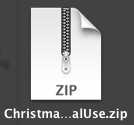
4. Zipped Files – You should be able to just right click a download zip file and it will unzip. If the file does not unzip, I suggest you read Ashley Hughes‘ comprehensive post on zipped files. Just click here.
4. I am so sorry but sellers cannot email you a Word document or the PDF file and here is why:
- The Terms of Use of purchased clip art and fonts forbid us from sharing any non-pdf files. Pdf files have locked graphics, therefore you cannot copy the graphic and place it into a new document.
- If we were to send you a Word file, your computer might not have the same version of Word as ours, you would not have our purchased font installed on your computer, and the margins would most likely be off. So even if we did send it, it would look totally different than the PDF file and it would take you hours to fix. Besides that, we might have made the file in Pages, Publisher, Adobe, Power Point, etc.
- It is not good business. We work hard creating products and we don’t want edited versions/variations of our product out there for free or for sale.
- Sellers cannot email you the PDF file. There have been stories of people scamming TpT authors by contacting them through TpT, asking for files to be emailed to them. These people had never purchased the file to begin with. If there is a problem or typo in the PDF, email the author. The author can update the file and then you can re-download. An alert will show up on your purchases page, allowing you to re-download.
5. Any billing questions should go through customer service at TpT. Sellers do not get paid directly from you, we are paid quarterly from TpT. We do not have the power to issue refunds. You can contact customer service by clicking the “Contact Us” link on TpT.
Thank you for your purchases. I hope this helped you out with your technical difficulties! I know that I would be so disappointed if I was unable to open a download. TpT is full of amazing and authentic teacher created resources!
Fellow TpT sellers, feel free to send customers the link to this post. I am happy to help out!

Good job Erica! Thanks for all your hard work and great info. 🙂
Jena
1st Grade with Miss Snowden
Very helpful!!! Thanks Erica 😉
Jessica Stanford
Mrsstanfordsclass.blogspot.com
I'm having my first linky ;D
Awesome post, Erica!!!
Thank you for sharing this. I have never run into any of these problems but it is good to know how to resolve them if they come up.
Thank you so much for this! I've been so confused on why it worked for 22,000 people but 10 couldn't open my freebie. I have since found out they are working on MACS. This was very informative.
I am not a seller nor do I play one on tv(why reinvent the wheel is my motto), but I am bookmarking your post to help my friends with issues (ok fine it will only address THIS issue LOL) Thanks for taking the time to do this!
Wonderful post, Erica!! Thank you for sharing!
Nicole
Rowdy in Room 300
Awesome post!
Jennifer
First Grade Blue SKies
Love you!!!
<33333 Thanks for the public service announcement, friend! 🙂
You are wonderful! Thank you, thank you, thank you! I'm bookmarking this post for future reference:)
Fantastic! I am adding this link to direct purchasers to right from my own website. 🙂 Thanks Erica!
Charity
The Organized Classroom Blog
Thanks Erica! I have had the problem with the black bars and it took me a while to figure it out. This will be helpful to others! A friend of mine had a problem with being charged three times for an item because she clicked too many times on the pay screen. TpT was awesome and refunded her money ASAP!
Stephany
http://primarypossibilities.blogspot.com/
AMEN!
And thanks to Paul and his staff at TpT that have deleted the ugly comments/feedback I have gotten because people had "black marks" on their items!
Thank you!!
I have also found that if your computer is old (like mine), it will download fine and then not and show the corrupted file message. I log off the internet and log back on and it works.
Thanks for the tips.
Jill bubbalulu.blogspot.com Tales From Second
Do you need to log off and then open the file in your computer?
Thank you for compiling this. Makes it so easy for those who are not so "tech savy".
You are awesome! Thanks for sharing all these tips! We will refer others to here. You have done a GREAT job of explaining everything!
Diane
Glad I could help Diane!!
This is great!! I may have to use this indefinitely!!
thank you!
Michelle
3amteacher@gmail.com
The 3AM Teacher
Visit The 3AM Teacher FB Page
Haha! You are welcome!
Thanks for this blog post. I reposted on our blog!
Carrie
C&C Teach First
Erica,
Thank you so much for this post! I am brand new to TpT and only have my first free item posted. But I've been happily emailing my item to those who said they couldn't open or download my file. I didn't even THINK about giving people the ability to edit and resell my hard work. I also didn't think that some people would be scamming me. It was a free file this time but good to know for future reference. This was a very helpful post!!!
Dianne
Hopelessly Devoted to Teaching
Thank you! This is very helpful!
Great post, Erica,
I have been considering opening a TpT store, and this information was very helpful!
Thanks!
Kim
Finding JOY in 6th Grade
Thank you soooo much for sharing this! I made good use of it today, in fact!
-Brooke
Once Upon A First Grade Adventure
Excellent post! I'm going to refer to this on my facebook fan page. 🙂
Erica, thank you so much for posting this. I am a new seller on TPT. I read this post, and then the following day I had someone ask about the black bars. If I hadn't read your post, I would have had no idea how to respond. I would have been in a full panic, thinking that something was wrong with my file. I can not thank you enough for posting this…it was perfect timing!
I just noticed at the side of your blog that you wrote books for Scholastic. That is so cool! It is even cooler that now you can make money directly through TPT!
Delighted in Second
Thank you Jennifer!
I am in love with your polka dot classroom signs and labels. Is there any way you would be willing to create the same set in primary colors??
Hi Courtney, I am working on it now! Thank you!
This is awesome, thank you so much!
Tara
Little Minds at Work
Hi Erica,
Can I post this as a document in the "TT" group?
Deb at Fabulously First
Erica,
Thank you so much!! I have several files with the blurry lines. I was unsure how to fix it on my Mac. Your directions were so simple and now my problem is solved!!
Aimee
aimee@vanmiddlesworth.org
Pencils, Books, and Dirty Looks
Thank you Erica! I just stumbled across this and have already shared the link with a few customers! I appreciate your hard work in putting this together!
Kristin
If you are looking for the best brand of computers like Dell, Hp, Sony and many others than you are at the right place. Find here best computers featured product deals, computer discounts, computer coupons, computer accessories deals and many others with great savings.