• Skip to primary navigation
  • Skip to main content
  • Skip to primary sidebar
  • Skip to footer

Ericas Ed-Ventures

Primary Education Ideas

  • Home
  • Blog
  • Classroom Decor Inspiration
  • Teacher Style
  • Shop
  • Contact

TpT Technical Difficulty Help: Printing, Opening, Missing Backgrounds, & More!

Printing and downloading issues are still a common problem.  I thought it time that I revisit this blog post that I originally posted it in the summer of 2014.
I get many questions in my TpT store, especially during decor season.  Most of these questions are related to some sort of technical difficulty.  I created this post to help answer those questions.  I hope it will give easy visual answers to your questions.   Feel free to pin this post and refer to it in the future or as a TpT seller, share with your customers.
Disclaimer: I am no computer genius.   I just know the basics and when I don’t know how to do something, I either play around until I figure it out, or I Google.
FYI – TpT has a wonderful Technical Support section that you may or may not know exists. You can click the image below to check it out!  They have just about every topic covered.

When you are leaving a Q&A, please make sure that you leave the Q&A under the exact product you have a question about.  This helps the seller know which product you are referring to and they in tern can better help you.

Sometimes a file is zipped.  It will look like the picture below.  You need to double click the icon to unzip the file.

Ashley Hughes has an extensive post on unzipping files if you are still confused.  Just click the image below.

Opening Files
You really should be opening all PDF files not created on your own computer with Adobe.  I have a Mac and it wants to default to Preview.  I love Preview, but it doesn’t always open PDF files the correct way.   You need to right click the file and then select “open with” and then select “Adobe Reader.”
If you don’t open with the latest version of Adobe Reader, you may see these:
Sometimes you may see these:

Corrupted Files – Rest assured the file is not corrupted and does not contain a virus.  It probably just was created in a computer with a newer version of Adobe or Word than you have on your computer.  Follow the steps above and it should open fine. 

What if you cannot get the PDF to Print?
Here are some things that might help you:
1.  Try to print the file as an image.  Go to options and then print as image.
2. If number one does not work, make sure everything is emptied out of your recyclable bin and delete as many extra files as possible.  Your computer might not have enough memory to send the information to your printer.
3.  Repeat step one and instead of printing the whole document, print one page at a time by page selecting.
4.  Delete the file from your computer and redownload it, then open it with the LATEST version of Adobe Reader (remember you have to restart your computer after you install it.)
5. If none of these ideas work for you, google for your specific printer and PDF printing problems.  Here are some generic tips from Adobe.
The Background Does Not Show Up
Sometimes when you open a PDF file the background does not appear.   This is ok, and it is still there.  Follow the steps above for printing as an image and it will work!
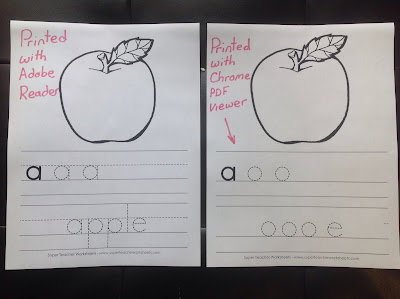
Sometimes the dotted lines on pages don’t show up.  Again, this is an easy fix if you open with Adobe and print as an image.  If you would like to read more about this, Super Teacher Worksheets has a post on it, click the image below.

Printing PDF’s at Different Sizes

Many times I get asked for mini-posters or desk-sized options for products.  There is no need for me to make these, you can just print the file at a reduced size.
You can print files at different sizes and even print two pages per printer page.  If you didn’t know this, I hope this post will help you.  Did you know that your printer settings usually want to scale the pdf down?  Check your printer settings before you print.  On my old PC I would have to print as borderless paper.  On my Mac, I have to click “scale” and then 100%.

Now, on to printing at a reduced scale on purpose! Last year, I made a ton of  word wall headers and word wall cards packets LARGE!  The reason I did this was because many teachers told me they needed to display their word walls above closets and they really wanted them big.  Also, the large size allows the file to be printed at a reduced size, if “LARGE” does not work for you.  You can always reduce a file in size to print, but often you lose a bit of the image when you enlarge.  So to err on the side of caution, I made the files LARGE.

Here is a little picture tutorial on how to reduce the file size.  I opened my Bright Table Labels file in Preview, but it should be similar to opening a file with Adobe Reader.

Here are visual tutorials on how to print more than one slide on page.
Deedee and Abby taught me this cool trick!

This “print” screen shot is from my friend, Deedee.  She has a PC and helped me out.  So, if you have a PC, it may look more like this if you want to change your print settings.

Printing Poster Sized
Traci of Dragonflies in First created a post on how to print poster sized.  The post is on Blog Hoppin’ you can click the image below to check out the post.
Printer Recommendation

I also get asked all the time about printer recommendations.  I love my printer and the ink (though expensive) lasts for over 1,000 pages!  You can always buy the off brand ink and it works just as well!  Click on the picture below to check out my printer on Amazon.com.  Update 8/8/18 – I brought this printer to school and bought the white updated version (see below) of it for home.  The new one still prints just as well and matches my office better, plus I LOVE having a color printer at school.  I had to promise not to ask for ink or repairs from my district to get them to hook the printer up for me.

Embedded Fonts in Editable PDF Files

When a font is embedded in a PDF file, there is no need to download and install the font to your computer.  It is embedded in the PDF itself using Adobe Pro.  The issue that many people have is that they don’t open the file with the latest version of Adobe Reader.  When that happens, the font defaults to Helvetica or it shows up out of alignment.

Installing Fonts

Some editable files require that you download and install a font to your computer.  Above is how I install fonts on my Mac.  After I install, I need to restart my computer.

Here is a great post from my friend, Rachel Lamb, on installing fonts.  Just click below.
Also one of my  favorite font artists, Kimberly Geswein, has a great post on her blog about installing fonts on a Windows computer.  Click the image below to check it out.

Thank you for reading this post!
I hoped it helped you.

Here are some of my TpT products you may be interested in:


Filed Under: Technology, Uncategorized

Previous Post: « The Anatomy of a Book Baggie
Next Post: Back to School Student Gifts {FREEBIES} »

Reader Interactions

Comments

  1. Laura Letiecq

    August 10, 2016 at 12:24 pm

    Thanks for putting all of this in one spot. I know I have had some of these issues myself, even when printing my own things. I recently forgot to print to actual size and was wondering why my linking cubes would not fit. Thankfully it was a single page test print, not the whole set.

  2. Barbara Balius

    August 19, 2016 at 12:56 am

    Great post, Erica!

Primary Sidebar

  • Email
  • Facebook
  • Instagram
  • Pinterest
  • Twitter
  • YouTube

Search

Categories

Subscribe via Email

Featured Products

Disclosure: This website/blog contains affiliate links.  What that means is that when you click on a link to a merchant and purchase something, I get a small percentage of the sale at no additional cost to you.

Footer

Latest on Instagram

Select a size tablecloth for your classroom! This Select a size tablecloth for your classroom!  This is great for messy projects or your pencil station table.  Want the link for this easy to use roll?  Comment LINK below.

#amazonfinds #classroomfinds
Bat themed activities and resources for first grad Bat themed activities and resources for first grade!  Want the links to everything you see?  Comment BATS below and I will DM you.

#bats
🍂🎃 Looking for a FUN fall read-aloud activity that 🍂🎃 Looking for a FUN fall read-aloud activity that’s ready to go? Meet Stumpkin! 🎃🍂

This FREE digital resource is packed with everything you need for a Halloween/fall themed morning meeting + reading response! 📚✨

🍁 Morning Meeting
🎃 Stumpkin read-aloud
✏️ Reading response
💬 Discussion & comprehension
🧠 Activities to keep your little learners engaged

And the best part… IT’S FREE! 🙌

Perfect for an October morning or a cozy Friday activity! 🍂

💬 Comment STUMPKIN and I’ll send you the link! 🔗

Save this Reel so you have it when you’re planning your October lessons! ❤️

#firstgradeteacher #firstgrade #firstgradeteachers #teacherideas  #morningmeeting
My students LOVE that game. I will hear a random My students LOVE that game. 

I will hear a random meow and say “remember, to keep your headphones on!”

#teacherhumor #iready
🎂Happy 20th Birthday @teacherspayteachers ! I hav 🎂Happy 20th Birthday @teacherspayteachers !

I have been with TpT since 2008!  I remember looking for a place where I could share my computer created resources with other teachers without having to set up my own website.  TpT was suggested.  I started off with a few Microsoft Word created resources 😬. At the time, the founder of TpT, Paul and his brother Dana, were single-handedly running things. I loved getting their newsletters.

In 2009 I was in a NY times article for TpT about who owns the copyright to teacher’s lesson plan ideas…the schools or the teachers.  This was not the article the author or editors told me I would be in, but that is another story! 

I stuck with TpT and creating resources and then in 2011, the site really took off and I met all these other amazing teacher-authors and finally met Paul in real life! 

As a single homeowner on a teachers salary, I worked nights and weekends on TpT resources just to be able to afford to live in my little house.  Then something amazing happened, my hard work paid off and I was able to get myself some breathing room.  I am so grateful for TpT for giving my life purpose and financial freedom back in those days.  Even though I am married now, I am so proud of myself for being able to own that little house (I still have it and rent it out) and buy my forever home in my dream neighborhood all by myself.

So many of you found out about TpT and so many more sellers joined.  It truly became the open market place that Paul envisioned all those years ago. 

TpT is still a big part of my life all these years (and hair colors) later.  I know when I eventually retire from teaching, I will be able to do TpT full time.  I love creating and sharing resources (880 and counting) with all of you.

#happybirthdaytpt #tpt
Are you looking for editable parent-teacher confer Are you looking for editable parent-teacher conference slides? These slides will keep you focused, keep your conferences on schedule, and help you feel confident.  You can edit them to meet the needs of your classroom and then duplicate that for every student, adjusting the information as needed. 
Want the links?  Plus, I will send you my FREE editable reminder slips! Just comment LINK below and I will DM you :)

#parentteacherconferences
Teachers, is your wing/team looking for an easy Ha Teachers, is your wing/team looking for an easy Halloween costume idea?  What about The Spice Girls and everyone wears an apron with a different spice!
🎃What other group costume ideas have you done at your school?
Want the link to these aprons, comment exactly SPICE below and I will DM you the link.  It is auto set to send only for that word.

#grouphalloweencostume #halloweencostumeideas
Follow on Instagram

Copyright © 2026 · Website Design By Jumping Jax Designs