• Skip to primary navigation
  • Skip to main content
  • Skip to primary sidebar
  • Skip to footer

Ericas Ed-Ventures

Primary Education Ideas

  • Home
  • Blog
  • Classroom Decor Inspiration
  • Teacher Style
  • Shop
  • Contact

Printing at a Reduced Scale & Printing Multiple Slides Per Page – Plus More Printing Tips

This post is a smorgasbord of printing pdf file tips.  I have included printing at a reduced size, getting pdf’s to print when they won’t, and adding text to editable pdf files (not really a printing tip though).  I sincerely hope this post helps you – that’s why I wrote it!
I don’t know if you know this or not, but you can print files at different sizes and even print two pages per printer page.  If you didn’t know, I hope this post will help you.  Did you know that your printer settings usually want to scale the pdf down?  Check your printer settings before you print.  On my PC I would have to print as borderless paper.  On my Mac, I have to click “scale” and then 100%. 

Now, on to printing at a reduced scale on purpose!  If you have not already noticed, I made my latest word wall headers and word wall cards packets LARGE!  The reason I did this was because many teachers told me they needed to display their word walls above closets and they really wanted them big.  Also, the large size allows the file to be printed at a reduced size, if “LARGE” does not work for you.  You can always reduce a file in size to print, but often you lose a bit of the image when you enlarge.  So to err on the side of caution, I made the files LARGE.
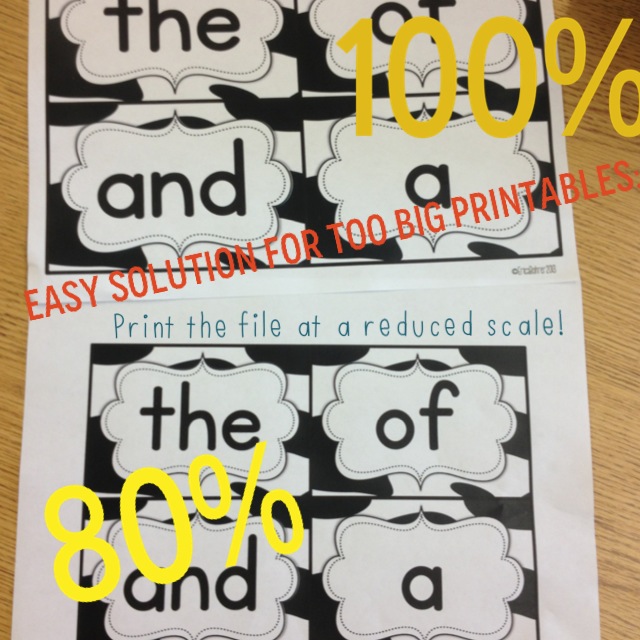
Here is a little picture tutorial on how to reduce the file size.  I opened my Bright Table Labels file in Preview, but it should be similar to opening a file with Adobe Reader.

Here are visual tutorials on how to print more than one slide on page.
Deedee and Abby taught me this cool trick! 

This “print” screen shot is from my friend, Deedee.  She has a PC and helped me out.  So, if you have a PC, it may look more like this if you want to change your print settings.

I also get asked all the time about printer recommendations.  I love my printer and the ink (though expensive) lasts for over 1,000 pages!  Click on the picture below to check out my printer on Amazon.com.  Also, you can sign up for HP Academy to receive discounts and coupon codes on ink!

What if you cannot get the PDF to Print?

I had to add to this post because a lot of people seem to be having trouble printing PDF files.

Here are some things that might help you:
1.  Try to print the file as an image.  Go to options and then print as image.  
2. If number one does not work, make sure everything is emptied out of your recyclable bin and delete as many extra files as possible.  Your computer might not have enough memory to send the information to your printer. 
3.  Print one page at a time by page selecting. 
4.  Delete the file from your computer and redownload it, then open it with the LATEST version of Adobe Reader (remember you have to restart your computer after you install it.)
5. If none of these ideas work for you, google for your specific printer and PDF printing problems.  Here are some generic tips from Adobe.
Embedded Fonts in Editable PDF Files

When a font is embedded in a PDF file, there is no need to download and install the font to your computer.  It is embedded in the PDF itself using Adobe Pro.  The issue that many people have is that they don’t open the file with the latest version of Adobe Reader.  When that happens, the font defaults to Helvetica or it shows up out of alignment.

I hope these tips helped you!!!  Happy printing.

Filed Under: Blogging and TpT Tips, Teachers Pay Teachers, Technology, Uncategorized

Previous Post: « Sunday Smorgasbord – July 28, 2013
Next Post: Back to School Bash Giveaway Hop! Bash Basket Two »

Reader Interactions

Comments

  1. Michaela

    July 30, 2013 at 10:58 pm

    I love this Erica! I get this question all the time. Now I have a great place to send people! 🙂

  2. Amy J

    July 30, 2013 at 11:06 pm

    Thanks, Erica! I always forget I can do this. 🙂

    Amy
    What Happens in First Grade

  3. Susanna Westby

    July 30, 2013 at 11:12 pm

    OMG – that's genius! THANK you!
    🙂
    Susanna
    Whimsy Workshop

  4. Kristen

    July 30, 2013 at 11:50 pm

    This is wonderful Erica, thank you!!

  5. Cheryl E.

    July 31, 2013 at 12:02 am

    Thank you so much for this tip!!!
    Cheryl
    Crayons and Curls

  6. k

    July 31, 2013 at 12:27 am

    I was just trying to figure out how to print more than one copy of the same page… but I think its different for a PC than a Mac. Any tips on how to do it with a PC? I don't have the "copies per page" option 🙁

    Kristin
    kristinbrehm@gmail.com

    • Erica Bohrer

      July 31, 2013 at 1:33 am

      I just added some photos from a PC. Check them out.

  7. Mrs. Sether

    July 31, 2013 at 12:34 am

    I just asked a friend about this an hour ago because I wanted to purchase your word wall headers and thought I had seen info about how to print multiple pages on one sheet on your facebook page earlier this summer but couldn't find it. 🙂 Thanks so much for posting again!!

  8. Lisa Bee (Grade 4 Buzz)

    July 31, 2013 at 12:53 am

    Thanks, Erica! I had forgotten about this great feature!
    -Lisa
    Grade 4 Buzz

  9. Lori @ Life in Room 24

    July 31, 2013 at 1:31 am

    Thanks so much for the helpful tips! I always 'meant' to figure that out on my own, but never got around to it.

    Lori
    Life in Room 24

  10. Mrs. Griffith

    July 31, 2013 at 1:46 am

    Wow! This is so helpful. Thanks for taking the time to put this together and educate people like me who had no idea it existed!!!

    Lindsay
    For the Love of First Grade

  11. Faithinhim

    July 31, 2013 at 2:56 am

    Great tips!! Thanks for showing!
    Ashley
    http://www.theblessedocdiva.blogspot.com

  12. Mikaela

    July 31, 2013 at 3:16 am

    This is helpful! Thank you!

  13. Just Wild About Teaching

    July 31, 2013 at 3:21 am

    Thanks so much for the easy tutorial girl!

    justwildaboutteaching.blogspot.com

  14. Where the Wild Things Learn

    July 31, 2013 at 3:51 am

    I love being able to do this.. such a time and ink saver sometimes!! Your tutorial is an amazing help to everyone.. thanks for taking the time to do it 🙂

    Amelia
    wherethewildthingslearn

  15. Steve O'Neil

    November 8, 2013 at 4:00 am

    Thank you for posting so many useful tips. This would be extremely helpful for a few people in my family. Maybe now they won't find it necessary to go into Oakville for printing jobs all the time.

  16. Joan

    July 2, 2014 at 1:33 am

    Thank you so much!

  17. ruchi sharma

    August 14, 2014 at 7:04 am

    Thanks for sharing information .This is very helpful.
    All Printer Support

  18. deny lost

    August 28, 2014 at 9:49 am

    I think I have never seen such blogs ever before that has complete things with all details which I want. So kindly update this ever for us. printing

  19. Kiara Thorne

    December 12, 2014 at 9:09 pm

    This is actually really helpful for me! I print things every single day for my clients. Thank you for posting this, it's just what I was looking for. http://lafayette-biz.com/printers.html

Primary Sidebar

  • Email
  • Facebook
  • Instagram
  • Pinterest
  • Twitter
  • YouTube

Search

Categories

Subscribe via Email

Featured Products

Disclosure: This website/blog contains affiliate links.  What that means is that when you click on a link to a merchant and purchase something, I get a small percentage of the sale at no additional cost to you.

Footer

Latest on Instagram

Create a student portfolio with banners! Start wi Create a student portfolio with banners!  Start with day one and save your display banners throughout the year to create a keepsake of the year for each student. 
The banners are print and go and some are Freebies in my store.  You could also grab the bundle and be set for the whole year! 

Want the links?  Comment “banners” below and I will DM you the link. 

#firstgradeteacher #studentwriting #teacherspayteachers
Teacher Tip: Keep ready made reminder slips and “t Teacher Tip: Keep ready made reminder slips and “to do” notes on your desk for easy access.

This saves you time and energy and just a bit more organized.

Want the link?  Comment “slips” below and I will DM you.

#teachertips #teacherhacks #classroomorganization #teachersfollowteachers
Do you have students who struggle with number sens Do you have students who struggle with number sense?  I have a free visual number path for you.  Want the link?  Comment “number path” below and I will dm you the link.

#numberpath #eurekamath #firstgrademath #teacherfreebies
Probably a little late to this Kinda Chic trend bu Probably a little late to this Kinda Chic trend but I am old 😂.
Yes, I still dress up everyday.  I only wear sneakers on dress down days or for field trips, but I am not going to judge you for what you wear.  I have seen teachers running after kids, so I get wearing sneakers to work.  I love shopping, plus dresses are just more flattering and easier for me to wear.

I have always had a very organized and clearly labeled classroom.  That is my calm.  Some FB ladies have said it is too busy but it works for me.  I have never seen a kid getting distracted by it, there is so much more to distract them…like other kids.

I started small group weight training classes @elevationfitnessli in March of 2025 and have been going regularly.  I enjoy meeting and becoming friendly with the other teachers at our 4:30 classes.  I also love that I can see physical changes as well.  Pull-ups are so hard but I am proud of my progress.

I still love teaching after 24 years.  I don’t love how it has become harder than it was when I started (bigger class sizes, more behaviors, more curriculum to cover, etc.) but I still love connecting with my students and helping them grow.  We can retire at 55 years old, as a tier 4 teacher, and I think I will be ready then to go.  I am lucky that I have been able to stay in the same grade for almost all of those 24 years!

I have been a TpT seller since 2008 and a blogger since 2011!  Thank you all who have been with me over the years and welcome new teacher friends!

#kindachic
The first few weeks of school are all about modeli The first few weeks of school are all about modeling and practicing routines.  These are routines that will be reinforced all year long.  We can’t expect students to know how we expect them to do things, even simple things like walking in the hall without explicit instruction. 
🏫I teach my students to walk on the third tile from the wall when in line.  1. This gives them something to concentrate on while walking.  2. This keeps their hands off the walls.  This keeps their hands away from artwork and away from germs.  If you are a teacher you know first hand what students can do to walls 😂.
My students earn incentives for compliments from other teachers about their behavior.  They are so proud when they earn. *Of course, if you have students with special needs you would not expect everyone to walk on the third tile. Teachers know their students and what they are capable of.
F R E E Friday! 🚌My students love morning meeting F R E E  Friday! 🚌My students love morning meetings, I love morning meetings, and subs love them, too.  I have weekly themed meetings slides that I use throughout the year.  You can easily edit them or add to them.  When I am absent, I add my phonics, writing, and math slides to them to make it easier for a sub to get through the day. 
🏫You can grab a free sample slide set for the first day of school by commenting BTS below. 

#freefriday #teacherfreebies #morningmeeting #firstgradeteacher #backtoschool
Take the stress out of dismissal with a dismissal Take the stress out of dismissal with a dismissal binder!  I have been teaching for over two decades and this is something I use this everyday. 
How it works:
1. Gather student information on through the student information sheets.  I send these home in June but also place one in summer mailings.  If we can’t mail, I attach a PDF to a parentsquare message.
2. Once the info comes in, I number the pages according to the students’ abc order.
3.  I take the info from the sheets and type it into my editable templates.
4. I print the template pages and organize in a binder.
Want all the links?  Comment LINK below and I will FM you. 

#classroommanagement #teacherhacks #teachersofinstagram #teachersfollowteachers
Follow on Instagram

Copyright © 2026 · Website Design By Jumping Jax Designs