• Skip to primary navigation
  • Skip to main content
  • Skip to primary sidebar
  • Skip to footer

Ericas Ed-Ventures

Primary Education Ideas

  • Home
  • Blog
  • Classroom Decor Inspiration
  • Teacher Style
  • Shop
  • Contact

Printing at a Reduced Scale & Printing Multiple Slides Per Page – Plus More Printing Tips

This post is a smorgasbord of printing pdf file tips.  I have included printing at a reduced size, getting pdf’s to print when they won’t, and adding text to editable pdf files (not really a printing tip though).  I sincerely hope this post helps you – that’s why I wrote it!
I don’t know if you know this or not, but you can print files at different sizes and even print two pages per printer page.  If you didn’t know, I hope this post will help you.  Did you know that your printer settings usually want to scale the pdf down?  Check your printer settings before you print.  On my PC I would have to print as borderless paper.  On my Mac, I have to click “scale” and then 100%. 

Now, on to printing at a reduced scale on purpose!  If you have not already noticed, I made my latest word wall headers and word wall cards packets LARGE!  The reason I did this was because many teachers told me they needed to display their word walls above closets and they really wanted them big.  Also, the large size allows the file to be printed at a reduced size, if “LARGE” does not work for you.  You can always reduce a file in size to print, but often you lose a bit of the image when you enlarge.  So to err on the side of caution, I made the files LARGE.
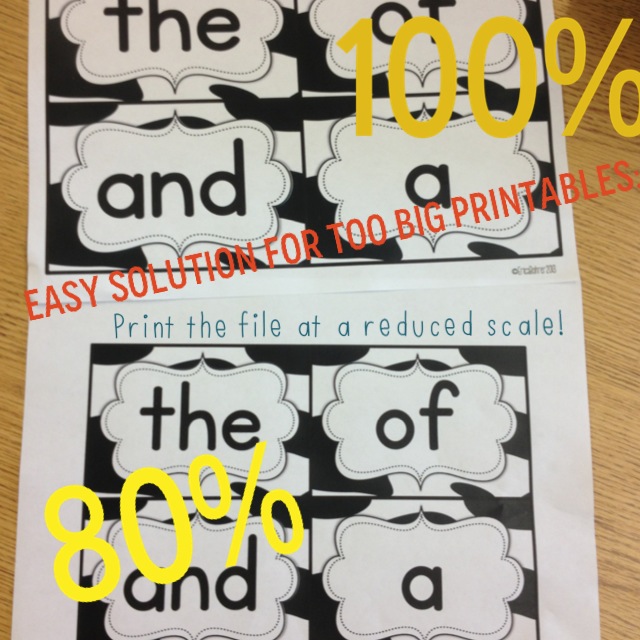
Here is a little picture tutorial on how to reduce the file size.  I opened my Bright Table Labels file in Preview, but it should be similar to opening a file with Adobe Reader.

Here are visual tutorials on how to print more than one slide on page.
Deedee and Abby taught me this cool trick! 

This “print” screen shot is from my friend, Deedee.  She has a PC and helped me out.  So, if you have a PC, it may look more like this if you want to change your print settings.

I also get asked all the time about printer recommendations.  I love my printer and the ink (though expensive) lasts for over 1,000 pages!  Click on the picture below to check out my printer on Amazon.com.  Also, you can sign up for HP Academy to receive discounts and coupon codes on ink!

What if you cannot get the PDF to Print?

I had to add to this post because a lot of people seem to be having trouble printing PDF files.

Here are some things that might help you:
1.  Try to print the file as an image.  Go to options and then print as image.  
2. If number one does not work, make sure everything is emptied out of your recyclable bin and delete as many extra files as possible.  Your computer might not have enough memory to send the information to your printer. 
3.  Print one page at a time by page selecting. 
4.  Delete the file from your computer and redownload it, then open it with the LATEST version of Adobe Reader (remember you have to restart your computer after you install it.)
5. If none of these ideas work for you, google for your specific printer and PDF printing problems.  Here are some generic tips from Adobe.
Embedded Fonts in Editable PDF Files

When a font is embedded in a PDF file, there is no need to download and install the font to your computer.  It is embedded in the PDF itself using Adobe Pro.  The issue that many people have is that they don’t open the file with the latest version of Adobe Reader.  When that happens, the font defaults to Helvetica or it shows up out of alignment.

I hope these tips helped you!!!  Happy printing.

Filed Under: Blogging and TpT Tips, Teachers Pay Teachers, Technology, Uncategorized

Previous Post: « Sunday Smorgasbord – July 28, 2013
Next Post: Back to School Bash Giveaway Hop! Bash Basket Two »

Reader Interactions

Comments

  1. Michaela

    July 30, 2013 at 10:58 pm

    I love this Erica! I get this question all the time. Now I have a great place to send people! 🙂

  2. Amy J

    July 30, 2013 at 11:06 pm

    Thanks, Erica! I always forget I can do this. 🙂

    Amy
    What Happens in First Grade

  3. Susanna Westby

    July 30, 2013 at 11:12 pm

    OMG – that's genius! THANK you!
    🙂
    Susanna
    Whimsy Workshop

  4. Kristen

    July 30, 2013 at 11:50 pm

    This is wonderful Erica, thank you!!

  5. Cheryl E.

    July 31, 2013 at 12:02 am

    Thank you so much for this tip!!!
    Cheryl
    Crayons and Curls

  6. k

    July 31, 2013 at 12:27 am

    I was just trying to figure out how to print more than one copy of the same page… but I think its different for a PC than a Mac. Any tips on how to do it with a PC? I don't have the "copies per page" option 🙁

    Kristin
    kristinbrehm@gmail.com

    • Erica Bohrer

      July 31, 2013 at 1:33 am

      I just added some photos from a PC. Check them out.

  7. Mrs. Sether

    July 31, 2013 at 12:34 am

    I just asked a friend about this an hour ago because I wanted to purchase your word wall headers and thought I had seen info about how to print multiple pages on one sheet on your facebook page earlier this summer but couldn't find it. 🙂 Thanks so much for posting again!!

  8. Lisa Bee (Grade 4 Buzz)

    July 31, 2013 at 12:53 am

    Thanks, Erica! I had forgotten about this great feature!
    -Lisa
    Grade 4 Buzz

  9. Lori @ Life in Room 24

    July 31, 2013 at 1:31 am

    Thanks so much for the helpful tips! I always 'meant' to figure that out on my own, but never got around to it.

    Lori
    Life in Room 24

  10. Mrs. Griffith

    July 31, 2013 at 1:46 am

    Wow! This is so helpful. Thanks for taking the time to put this together and educate people like me who had no idea it existed!!!

    Lindsay
    For the Love of First Grade

  11. Faithinhim

    July 31, 2013 at 2:56 am

    Great tips!! Thanks for showing!
    Ashley
    http://www.theblessedocdiva.blogspot.com

  12. Mikaela

    July 31, 2013 at 3:16 am

    This is helpful! Thank you!

  13. Just Wild About Teaching

    July 31, 2013 at 3:21 am

    Thanks so much for the easy tutorial girl!

    justwildaboutteaching.blogspot.com

  14. Where the Wild Things Learn

    July 31, 2013 at 3:51 am

    I love being able to do this.. such a time and ink saver sometimes!! Your tutorial is an amazing help to everyone.. thanks for taking the time to do it 🙂

    Amelia
    wherethewildthingslearn

  15. Steve O'Neil

    November 8, 2013 at 4:00 am

    Thank you for posting so many useful tips. This would be extremely helpful for a few people in my family. Maybe now they won't find it necessary to go into Oakville for printing jobs all the time.

  16. Joan

    July 2, 2014 at 1:33 am

    Thank you so much!

  17. ruchi sharma

    August 14, 2014 at 7:04 am

    Thanks for sharing information .This is very helpful.
    All Printer Support

  18. deny lost

    August 28, 2014 at 9:49 am

    I think I have never seen such blogs ever before that has complete things with all details which I want. So kindly update this ever for us. printing

  19. Kiara Thorne

    December 12, 2014 at 9:09 pm

    This is actually really helpful for me! I print things every single day for my clients. Thank you for posting this, it's just what I was looking for. http://lafayette-biz.com/printers.html

Primary Sidebar

  • Email
  • Facebook
  • Instagram
  • Pinterest
  • Twitter
  • YouTube

Search

Categories

Subscribe via Email

Featured Products

Disclosure: This website/blog contains affiliate links.  What that means is that when you click on a link to a merchant and purchase something, I get a small percentage of the sale at no additional cost to you.

Footer

Latest on Instagram

📚 Back-to-school magic starts with the right read- 📚 Back-to-school magic starts with the right read-alouds!
These are my absolute favorite first-week books for building classroom community, easing those first-day jitters, and setting a positive tone from day one.
From Our Class is a Family, All Are Welcome, The Book of Rules, and so many more — these stories never miss.

Which one is a must-read in your classroom? Drop it in the comments and I will send you the links to my follow up activities!

#BackToSchool #ReadAlouds #picturebooks
These play-doh first day gifts are cute and practi These play-doh first day gifts are cute and practical!  The play-doh gives your students something fun to do while you are busy greeting students at the door.  Then once everyone is in, then you can unpack supplies as a class. 

Want the link to the FREE tags and to see what else I do on the first day?  Comment “first day” below and I will DM you the links!

#teacherhack #teacherfreebies #playdoh #teachersfollowteachers #backtoschool
How do you handle this situation? Do you put the How do you handle this situation?  Do you put the new student at the end of the alphabetical list or do you start over with a new one?
I know I am next for a new student (I have 24 kids and everyone else has 25), so I am holding off until the night before the first day.  I wish I could just wait but I like modeling where their bags and mail goes, both of which are set up using numbers.

True story: One year on the first day, I had a no show.  Then I was assigned a new student.  That student fit perfectly in the alphabetical order spot that was left.  I should have played the lottery or something.  What were the odds of that?!

#teacherproblems #teacherhumor #primaryteacher
5 things that are worth the money for your classro 5 things that are worth the money for your classroom!

1. A color printer.  We don’t have color printers at school and this has saved me from having to remember to print something at home. I brought in mine from home and then bought a new one for home. 
2. MacBookAir - This is my personal laptop.  I bring it home on weekends and holidays but for the most part I keep it at school.  I did need approval to get it on our district WiFi, which meant my phone could not also be on the WiFi.  There is a one device per teacher rule.
3. A lay-flat binder for my plan book, dismissal binder, and sub binder.  These save so much space and they are flexible. 
4. A laminator at school and a laminator at home.  It took me many years before I caved and bought another one but again, it saves me from remembering to laminate at home and I can also laminate during snack time and preps. Matte laminating is also worth the splurge.
5. My teacher toolbox! This toolbox has been with me for over 10 years, I just change out the labels to go with my decor theme.  Everything has a place and it keeps my desk organized.

Want the links?  Comment “links” below and I will DM you them. 

#classroommanagement #amazonfinds #classroom #teacherhacks #firstgradeteacher
✨Center time just got so much better! ✨ These 1st ✨Center time just got so much better! ✨
These 1st grade phonics-based literacy centers keep my students engaged, independent, and actually cheering when I say it’s center time. 🙌
Year-long skills that spiral and build (short vowels → digraphs → blends → vowel teams → multisyllabic words and more), primary lined recording sheets, supportive visuals, and activities that are easy to prep once and reuse all year.

Perfect for Science of Reading classrooms, Fundations® users, Daily 5, or anyone who wants structured, decodable practice while you pull small groups.

My students know exactly what to do… and I get to teach without interruptions. Win-win! 📚💛

Comment LINK if you want a full year of ready-to-go phonics centers and a free sample set!
#PhonicsCenters  #LiteracyCenters #FirstGradeTeacher  #Phonics #WordWork ReadingCenters
🌻Sunflower Classroom Decor Room Tour🌻 This was my 🌻Sunflower Classroom Decor Room Tour🌻

This was my room decor before the pastels.  It worked well to incorporate my old farmhouse items (my decor theme before that) and as a bonus it made my Ukrainian students smile (the sunflower is the national flower of the Ukrainian).

Do you want the links?  Comment “sunflower” below. 

#classroomdecor #tptcheckoutmyclassroom #firstgradeteacher
Teacher Tip: Sort and store your printables for th Teacher Tip: Sort and store your printables for the upcoming weeks in a file tray above drawers for the days of the week.  This helps to keep you organized for the weeks ahead.
Save and use leftover colored copies as dividers. This makes them less bulky, than if you had used binder clips.
When you near the end of the week, pull the papers from the tray and sort into the weekday drawers and centers.

Have questions?  Ask them below!

#classroomorganization #classroommanagement #teachertips #teacherhacks
Follow on Instagram

Copyright © 2026 · Website Design By Jumping Jax Designs